
No, Windows 10 home PCs are not losing security updates next week. Microsoft moved the end of its consumer Extended Security Updates program from October 13, 2026, a date that falls this week, to October 12, 2027, and enrolled PCs carry over with no extra steps.
The confusion makes sense, because the old date was real and the change arrived quietly in June. Two separate 2027 deadlines are now in the news, and headlines keep blending them.
I have spent years as the person friends and family call when an update stalls or a scary warning pops up, so let me sort out which date applies to your PC.
In this answer
- What Microsoft Actually Changed
- Important Dates to Look Out For
- Who Gets the Extra Year
- The Other 2027 Deadline Is About Certificates
- How to Check Whether Your PC Is Covered
- If Your PC Is Not Enrolled Yet
- Work and School PCs Follow Different Rules
- What the Extra Year Will Not Do
- Use the Year to Plan Your Next Move
- What I Would Do This Week
What Microsoft Actually Changed
Windows 10 itself reached the end of support on October 14, 2025. Since then, home PCs have stayed patched only through the consumer Extended Security Updates program, which was designed as a one-year bridge.
In late June 2026, Microsoft rewrote its ESU documentation to show a new end date of October 12, 2027. Help Net Security reported the one-year extension after the change surfaced without a press release, and Microsoft described the extra year as more time to move to Windows 11.
Extended Security Updates, or ESU, is an add-on program that keeps sending critical and important security fixes to Windows 10 version 22H2 after normal support ends. It adds no new features and no general bug fixes.
Microsoft also says on its ESU page that enrolled PCs keep their coverage through the new date automatically, with no second payment and nothing to click.
Important Dates to Look Out For
Several dates are floating around, and only some of them apply to a typical home laptop.
| Date | What Happens |
| October 14, 2025 | Regular Windows 10 support ended |
| October 13, 2026 | Original end of consumer ESU, now replaced |
| May 17, 2027 | Update certificates expire for Windows 10 Enterprise 2019 LTSC and some Windows Server versions |
| June 19, 2027 | Update certificates expire for other supported Windows 10 and Windows 11 versions |
| October 12, 2027 | New end of consumer ESU |
For most home users, the bottom row is the one that counts. Your Windows 10 PC keeps receiving security fixes until October 12, 2027, as long as it is enrolled and keeps installing monthly updates.
The May and June rows belong to a different story about how Windows Update proves its own identity. I cover that below, because it is the part most guides skip.
Who Gets the Extra Year
The extension covers the same people who could join consumer ESU in the first place. Your PC qualifies if it meets every item on this list.
- It runs Windows 10 version 22H2 in the Home, Pro, Pro Education, or Pro for Workstations edition.
- It has the latest Windows updates installed.
- You sign in with a Microsoft account that has administrator rights, and it is not a child account.
- The device is personal, so it is not joined to a company domain or Microsoft Entra and not managed through MDM, the account and device control systems employers use.
- You enrolled through one of three routes, which are syncing PC settings with Windows Backup at no cost, redeeming 1,000 Microsoft Rewards points, or paying a one-time $30 plus tax.
Households with several machines get a break. One ESU license covers up to 10 PCs signed in to the same Microsoft account.
The Other 2027 Deadline Is About Certificates
On October 8, 2026, Microsoft published a notice for IT staff titled Prepare for Windows Update certificate rotation in 2027. A certificate here is a digital ID card that lets your PC confirm it is talking to the real Windows Update servers and not an impostor.
The current certificates expire on May 17 and June 19, 2027. Supported Windows 10 versions need the July 2026 security update or a later one installed before June 19. Windows 10 Enterprise 2019 LTSC needs the same update before May 17.
View this post on Instagram
Devices on unsupported versions lose access to Windows Update entirely. The change does not apply to PCs that receive updates through WSUS, an update server that some companies run in-house.
Did you know? Windows 11 version 25H2 and later already carry the new certificates, so those PCs need no action at all.
How to Check Whether Your PC Is Covered
Start with the boring stuff. All four checks below are read-only, so you have not broken anything yet, and you cannot break anything by looking.
- Press Windows key + R, type winver, and press Enter. You should see Version 22H2 and an OS Build number that starts with 19045.
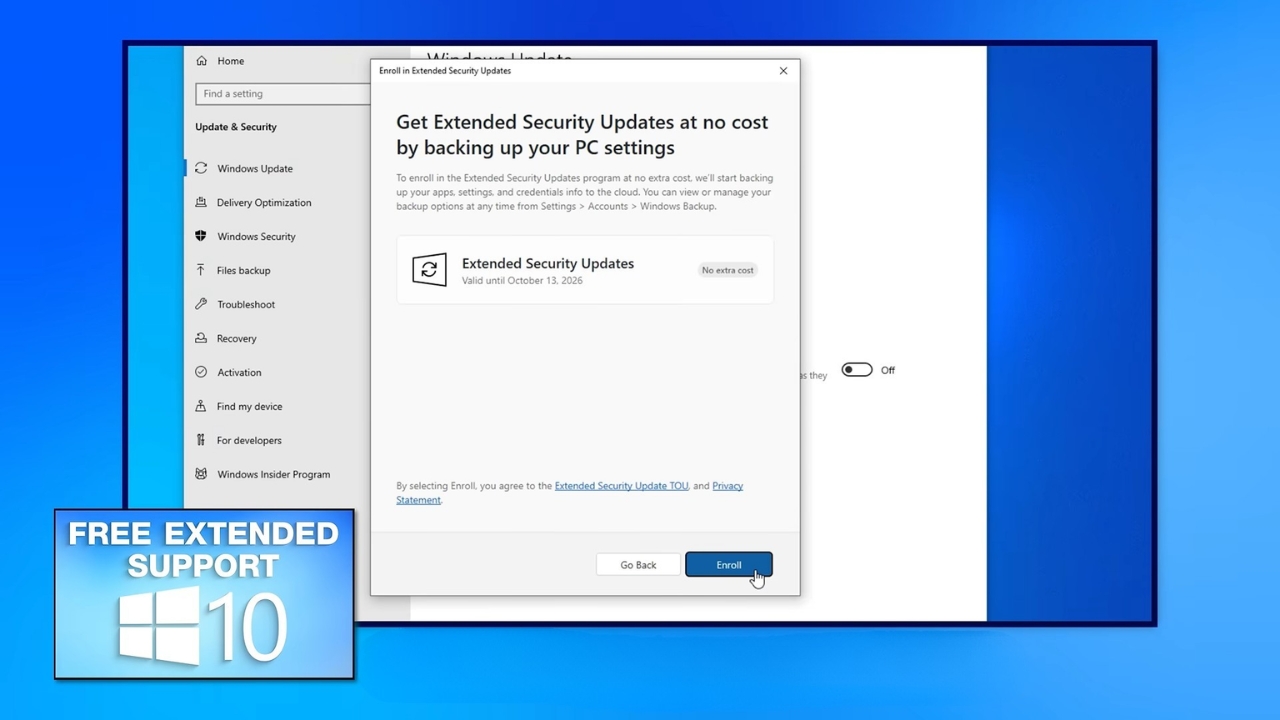
- Open Settings > Update & Security > Windows Update. An enrolled PC shows its ESU status on that page, while an unenrolled one shows an Enroll now link.
- On the same page, select View update history. Look for KB5099539, the July 2026 security update, or any later monthly security update.
- Select Check for updates and install anything waiting. If nothing new appears after a restart, you are current.
If all four checks look right, your PC is covered through October 12, 2027, and it already meets the certificate requirement.
If Your PC Is Not Enrolled Yet
Before you touch anything else, back up your files. Enrollment itself is low risk, but it may ask you to switch from a local account to a Microsoft account, and any sign-in change goes more smoothly when your documents and photos already sit on an external drive or in cloud storage.
If you copy them to a USB drive, it helps to know when you can unplug the drive without ejecting it.
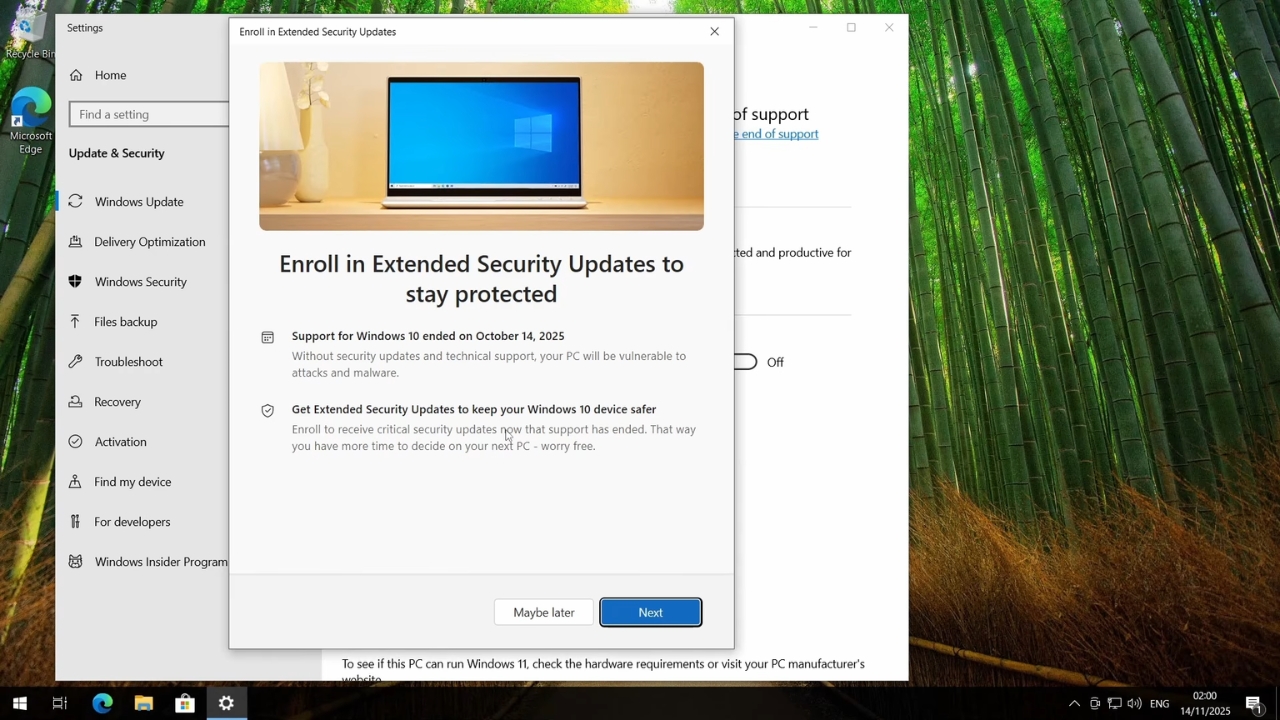
Once the backup is done, go to Settings > Update & Security > Windows Update and select Enroll now. Pick the free Windows Backup option, the Rewards points, or the $30 purchase.
Enrollment stays open until the program ends on October 12, 2027. Joining late still gets you every earlier ESU update, but your coverage stops on the same day as everyone else.
Work and School PCs Follow Different Rules
Consumer ESU is only for personal devices. A laptop issued by an employer or a school falls under the commercial ESU program for organizations, which runs on different pricing and offers organizations a longer runway.
- Year one costs $61 per device through Microsoft volume licensing.
- The price doubles each year, for a maximum of three years after support ends.
- Payments are cumulative, so an organization joining in year two also pays for year one.
By my own math from that doubling rule, $61 plus $122 plus $244 comes to $427 per device for all three years. If your work laptop runs Windows 10, the IT department decides what happens to it, and you do not need to enroll it yourself.
What the Extra Year Will Not Do
ESU keeps the locks on the doors, but it does not renovate the house. You get critical and important security fixes, and nothing else. There are no new Windows features, no general bug fixes, and no regular technical support from Microsoft.
Service deadlines can affect other devices, too. For example, an HP Instant Ink subscription can leave otherwise usable ink cartridges inactive after cancellation.
Confirmed date versus open question. Consumer ESU ends on October 12, 2027. Microsoft has not said whether home users will get another year after that, so treat that date as final until Microsoft says otherwise.
I would not plan around a second surprise extension. The first one arrived with no warning, and Microsoft has promised nothing beyond it. A PC that still needs Windows 10 in late 2027 will be running without patches, and that is a risky place to keep banking logins and family photos.
Use the Year to Plan Your Next Move
The useful question is not whether your PC survives until October 2027. It is what you will do after that date, and the answer depends on whether your hardware can run Windows 11.
Microsoft offers a free PC Health Check app that tests your processor, memory, and security chip against the Windows 11 requirements. If it passes, eligible PCs can upgrade through Windows Update and keep their files, although I would still back up first.
If it fails, start budgeting now rather than next September. Memory is getting more expensive as AI data centers buy up supply, the same pressure that pushed the starting iPhone price up by $100. A replacement bought calmly in spring usually beats one bought in a panic during the final week.
What I Would Do This Week
@mycomputerworksWindows 10 Extended to 2027! Huge News! Big news for Windows 10 users! 🚨 Microsoft has officially extended Windows 10 support through October 13, 2027 through updated ESU options, giving millions of users more time before needing to upgrade. If you’ve been avoiding Windows 11… this changes a lot. In this short, we break down what it means and what you should do next. 💻 🎬Checkout my Video on How To Enroll in the ESU for windows 10: https://www.youtube.com/watch?v=QTBvzE3sV7E Need help with your computer? 📞 Call My Computer Works: 1-866-340-3721 🌐 Visit: www.mycomputerworks.com #Windows10 #Windows11 #Microsoft #TechNews #ComputerHelp #WindowsSupport #MyComputerWorks♬ original sound – MyComputerWorks
Take ten minutes and run the four checks above on every Windows 10 PC in your home.
If winver shows 22H2, Windows Update shows ESU enrollment, and your update history includes the July 2026 update, you are covered for security fixes until October 12, 2027, and the certificate change will not touch you.
If the PC is not enrolled, back up your files and enroll before the end of the month. Then run PC Health Check once, write the result on a sticky note on the laptop, and use that answer to decide between a Windows 11 upgrade and a replacement fund.