I understand why people think their phone is listening. You talk about dog food, a new mattress, or a trip you haven’t searched yet, and then an ad appears as if your phone was sitting at the table with you. I don’t think people are foolish for noticing that pattern. That feeling is real.
The usual explanation, though, is less cinematic and more uncomfortable. Your phone doesn’t need to secretly record your ordinary conversations to make ads feel personal.
The tracking systems around apps, websites, location, accounts, and devices already know enough to make that happen.
The bigger concern is how much data your phone already shares
I wouldn’t tell readers to ignore microphone privacy. A bad app, maybe a compromised account, even a careless permission choice can still create real risk.
What I would separate is the popular claim from the broader privacy issue. The popular claim says phones constantly record everyday conversations and send them to ad networks. The stronger evidence points elsewhere.
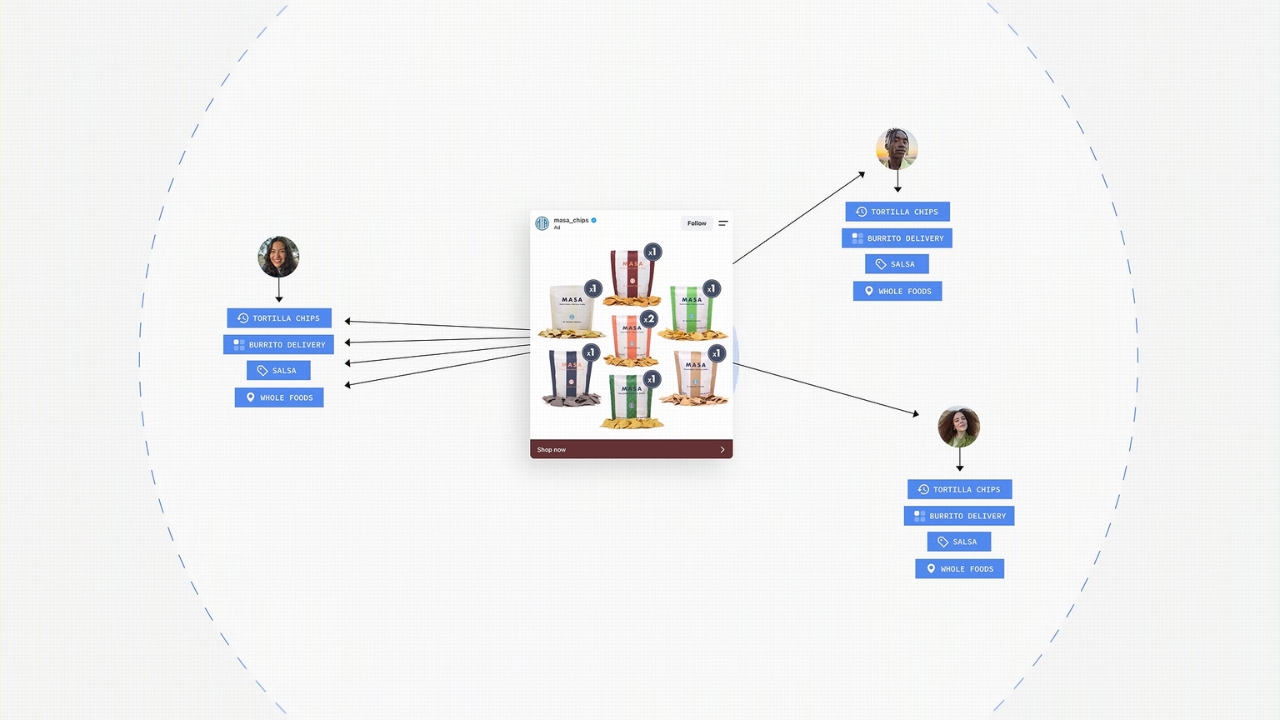
Ad targeting mostly comes from searches, website visits, app activity, location, device identifiers, purchases, uploaded customer lists, and behavior linked across services.
That doesn’t make it harmless. It means the privacy problem is bigger than one microphone setting, and fixing it takes more than covering the mic or turning off Siri.
What the research actually found
One of the better-known tests came from researchers who studied 17,260 Android apps for media leaks. Their 2018 Proceedings on Privacy Enhancing Technologies study looked for audio, image, video, and screen data leaving apps over the network.
And they found privacy problems, including unexpected screen recordings and image transfers in some apps, but it didn’t support the simple claim that popular apps were secretly sending microphone recordings for ads.
The evidence points in a narrower direction: researchers didn’t find support for constant microphone recording for ads, but they did find reasons to take app privacy seriously.
I read the evidence as a warning about app ecosystems, third-party software libraries, and permissions that people grant once and forget about them completely.
Why ads can feel like they heard you
Most targeted ads don’t need your voice but patterns. If you searched for a baby monitor last month, stood near a baby store, clicked a parenting article, used the same Wi-Fi as someone shopping for diapers, or watched a video about sleep schedules, you may get baby-related ads later. No microphone is required.
View this post on Instagram
Google’s own privacy policy says unique identifiers, including the Android Advertising ID, can be used for relevant advertising and managed in device settings. It also describes data from services, partners, apps, websites, location, IP address, cookies, and account activity. That is already a lot of signal before anyone reaches for a microphone theory.
The stronger official concern isn’t secret microphone ads. It is commercial surveillance. In September 2024, the FTC released a report on social media and video streaming data practices that examined how major platforms collect, use, share, and retain personal information. The FTC has also pursued data broker cases tied to sensitive location data. In the Kochava case, the FTC said the company and its subsidiary would be barred from selling, sharing, or disclosing sensitive location data without consumer consent. The case involved allegations tied to location data from hundreds of millions of mobile devices. That is the real privacy story. Voice assistants do listen for activation words, but that isn’t the same as streaming every kitchen conversation to an ad database. Google says Assistant waits in standby until it detects an activation such as “Hey Google,” and that short snippets aren’t sent or saved if no activation is detected. Google also says audio recordings aren’t saved on its servers by default. Apple made a similar point in a January 2025 statement, saying it has never used Siri data to build marketing profiles, never made it available for advertising, and never sold it. Accidental activations and assistant privacy still deserve attention, but they aren’t proof that ad targeting runs on casual speech. I would start with permissions, but don’t panic. On iPhone, Apple says an orange indicator means the microphone is being used by an app, while a green indicator means the camera, or camera and microphone, is being used. On Android, Google says a green indicator appears when an app uses the camera or microphone, and users can tap it to see which app is involved. Android also has a privacy dashboard where you can review which apps accessed permissions and when. I would remove microphone access from apps that don’t need it, then do the same for precise location, camera, contacts, photos, and Bluetooth. A VPN can hide some browsing activity from your internet provider and change how your IP address appears to websites. It doesn’t erase your signed-in Google account, stop an app from collecting data you gave it permission to collect, remove cookies inside a browser, or stop a social platform from using your activity inside its own app. Private browsing has similar limits. It can help keep local browsing history off a shared device, but it doesn’t make you invisible to every service. I use privacy tools as layers. I don’t treat any one of them as a clean reset button. I pay closer attention when: That still doesn’t mean “ads are listening,” but it does mean you should check. A hacked account can expose far more than a single microphone permission. I don’t think the everyday ad problem is that your phone sits there recording lunch conversations. I think the worse answer is that it often doesn’t need to. The ad system already has searches, clicks, location clues, account activity, app behavior, device identifiers, and data shared by other companies. That should make us calmer about the microphone rumor and more serious about privacy settings. If an ad feels too personal, don’t just ask “Was my phone listening?” Ask which app, account, location setting, or data trail made that ad possible.
Regulators are worried about the data trail
Voice assistants are different from ad spying
What I would check on your phone today
A VPN helps, but it doesn’t erase tracking
When you should be more concerned
FAQs
What I would take from all of this